


Last week, during a training session with Haoyang, a Localization Engineer at TransPerfect, we tackled a specific pre-flight challenge involving a raw CSV export simulating a complex CMS hand-off.
Haoyang's requirement was straightforward: populate the empty target columns with source text to serve as placeholders for linguists. However, upon analyzing the file, I noticed it contained a mix of rigid structural patterns and messy, multi-line content (including WordPress XML tags).
While writing a Python script is a standard approach for data manipulation, I determined that for this specific volume and structure, it would be overkill. Instead, I opted for a more immediate and lightweighted approach using Regular Expressions (Regex) directly within the text editor. This method allows for rapid data processing without the overhead of environment setup.
This post documents the Regex logic I implemented to solve this complex pre-flight task.
1. The Big Picture: The Rhythm of the File
The demo file was designed to test edge cases. It followed a strict, repeating three-line rhythm for every single translatable field:
- Row 1 (Source): The default definition containing the original English text.
- Row 2 (Hash): A system hash used for version control.
- Row 3 (Target): The translation row, which is initially empty.

The goal was simple: move content from Row 1 to Row 3. However, data integrity was paramount: I had to ensure that these three lines belonged to the exact same Field ID. If a "Description" string was copied into a "Title" translation slot, the entire import would fail.
2. Hidden Complexities (XML & Newlines)
At first glance, a simple wildcard match (.*) seemed sufficient. However, a closer inspection of the cell data revealed significant irregularities.

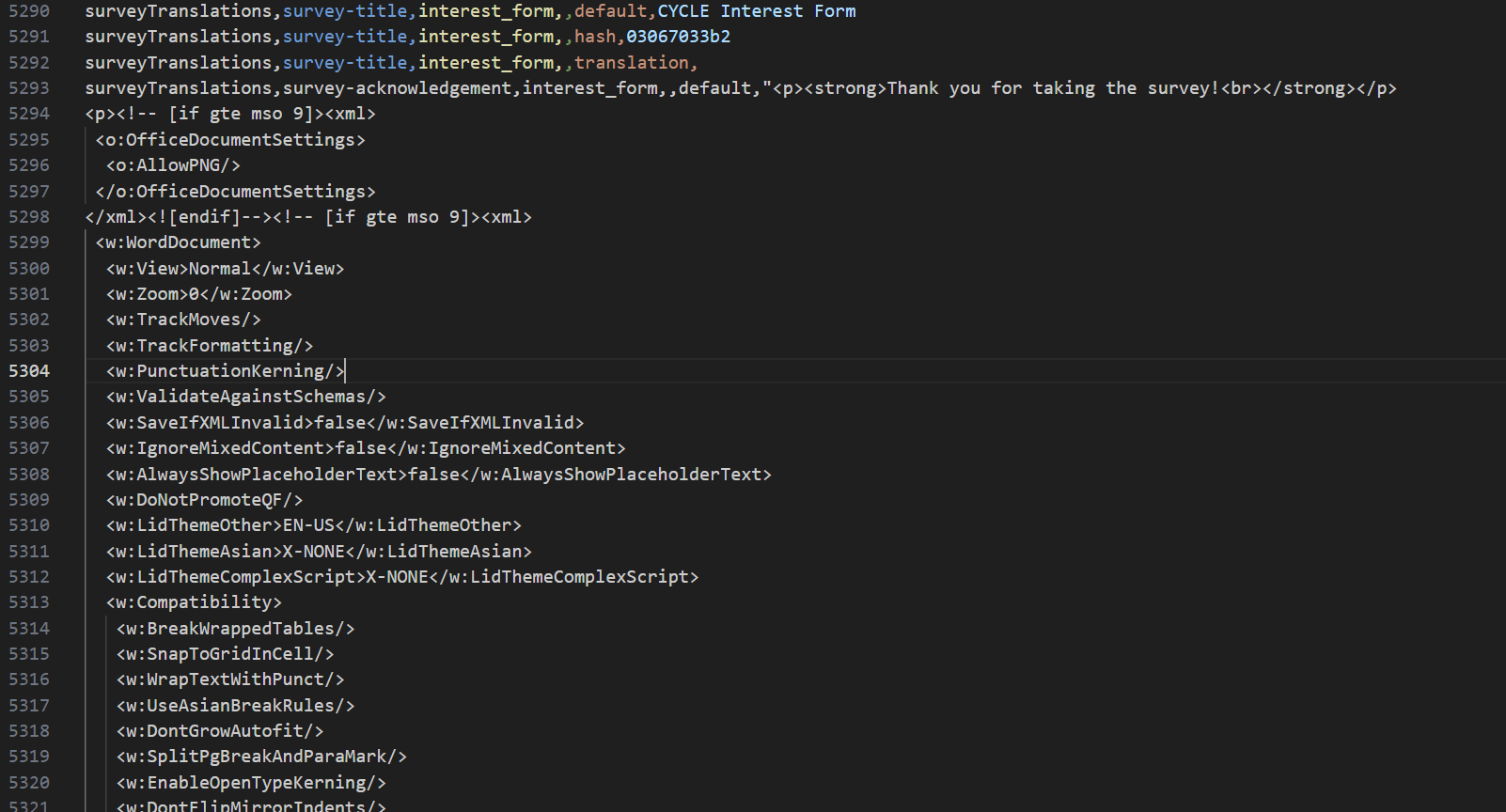
The source text contained WordPress XML tags and hard line breaks inside the text cells.
Standard Regex (.) does not match newline characters. As soon as the pattern hit a line break in those XML paragraphs, the match failed. To address this, I needed a "universal" matcher:
[\s\S]*?This character set matches "any whitespace character OR any non-whitespace character"—effectively capturing absolutely everything, including new lines. By using [\s\S]? instead of ., I could capture complex XML blocks without the pattern breaking on formatting.
3. Ensuring Data Integrity with Backreferences
With content extraction solved, the next priority was safety. I needed to guarantee that the text captured belonged to this specific field, avoiding any risk of misalignment.
I useed the Backreference (\1) mechanism to enforce this logic:
- The Capture: In the first line, I used parentheses () to group the unique Field ID. This becomes Group 1.
- The Enforcement: In the subsequent lines (Hash and Translation), I used \1.
The \1 instructs the Regex engine to validate that the subsequent lines start with the exact string captured in Group 1. This acts as a strict validation gate, ensuring I are processing a cohesive block of data.
4. The Final Assembly
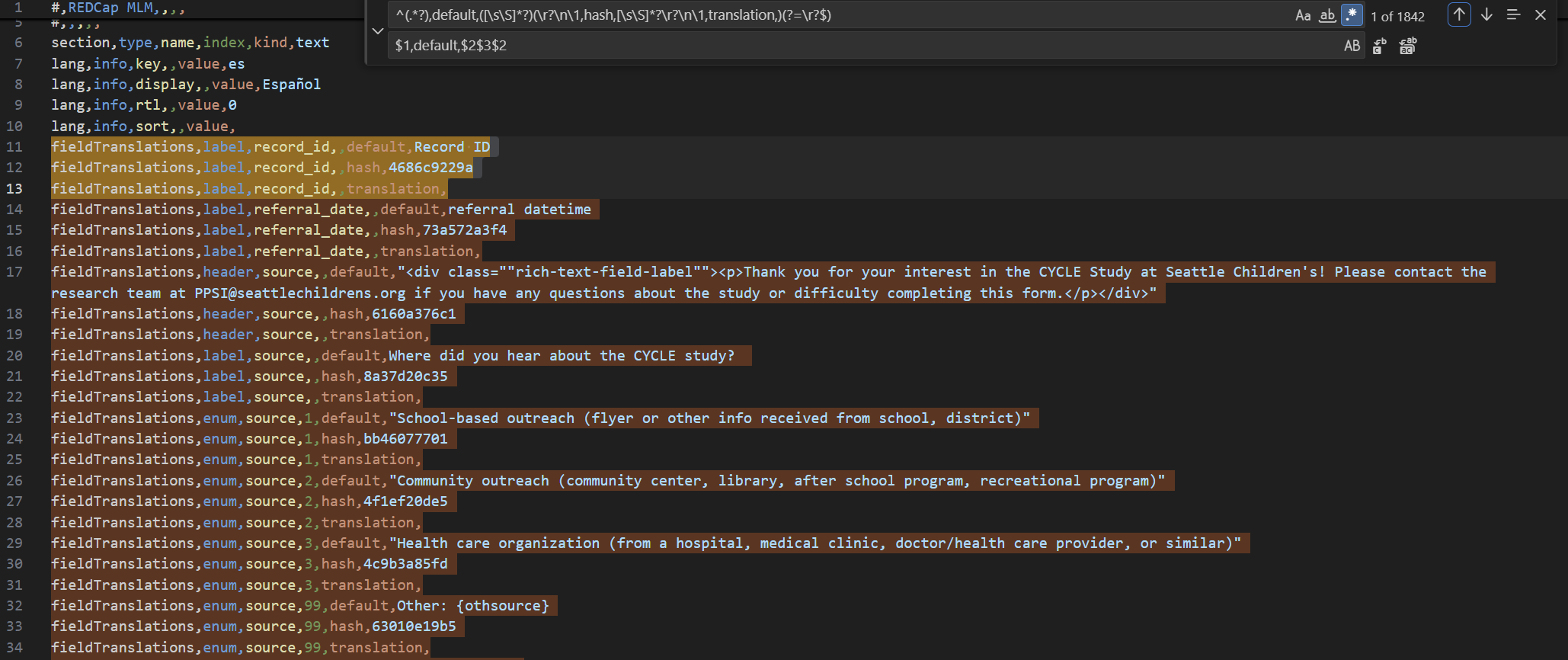
Putting it all together, the final operation looks like this:
The Search Pattern:
^(.*?),default,([\s\S]*?)(\r?\n\1,hash,[\s\S]*?\r?\n\1,translation,)(?=\r?$)The Replacement:
$1,default,$2$3$2Here is the breakdown of the logic:
- $1: Restores the validated field ID.
- $2: Restores the original source text (preserving XML tags and newlines).
- $3: Restores the structural "bridge" (the newline, the hash row, and the start of the translation row).
- $2 (Again): Populates the translation slot with the source text.
5. Why I Choose Regex for Pre-flight
From an engineering perspective, choosing Regex for this specific task offers several advantages over scripting:
- Efficiency: It eliminates the need for environment setup or dependency management.
- Precision: The Backreference mechanism (\1) ensures structural integrity, treating the data blocks as immutable units.
- Versatility: The [\s\S] pattern is agnostic to content type, handling HTML, XML, or JSON strings seamlessly.
6. Wrapping Up
Sharing the final output with Haoyang was honestly the best part of the session. He called out how effective and robust the Regex solution was, and mentioned that while the problem itself is fairly common, this particular approach and the way the Regex was constructed were things many engineers at the company had not thought of before.
Hearing that was really encouraging. It was a good reminder to me that maybe I do not always need a new library or a heavy toolchain to solve a problem. Sometimes, solid fundamentals applied in the right way can be just as powerful.
For me, this solution felt like a very representative example of that mindset. The problem, the constraints, and the use of classic concepts like Regex backreferences all come up frequently in real-world localization and data workflows. That is why I decided to write this post and document the approach, both as a reference for myself and something others might find useful in similar scenarios.